
The Unreasonable Effectiveness of SDFs, Part 3
Last Updated: 2025-10-09
He's going for speed
He's going the distance
Hey!
Today's Menu
In the previous article, we had solved the essential Big Scary Problem of streaming SDFs by using a mildly crazy shader that evaluates an RPN expression. Here, we'll talk about some practical concerns, as well as the important topic of how to *build* the data that the GPU shader consumes. There are a few different topics to discuss; let's start with ...
Performance
I want my game to run on lots of systems, so I am targeting "moderately old" graphics cards. My main dev machine has a GPU that was mid-range in 2019 [note 1], so a bit old by now. Unfortunately, the slightly grotesque shader described in Part 2, which makes this all work, is slightly too demanding. In a large window, with a moderately-complex SDF being drawn over every pixel of it, the frame rate dips — the fill rate is too low.
This was early in development, and I knew things were only going to get more complicated, so it needed to be fixed. Luckily, due to my inexperience (I didn't fully comprehend the issue for a while) and the fact that I had a lot of other stuff keeping me busy, the problem had time to percolate in my mind, so I think I came up with a good solution. It's nice when the world conspires to give you the resources you would've wanted anyway (:
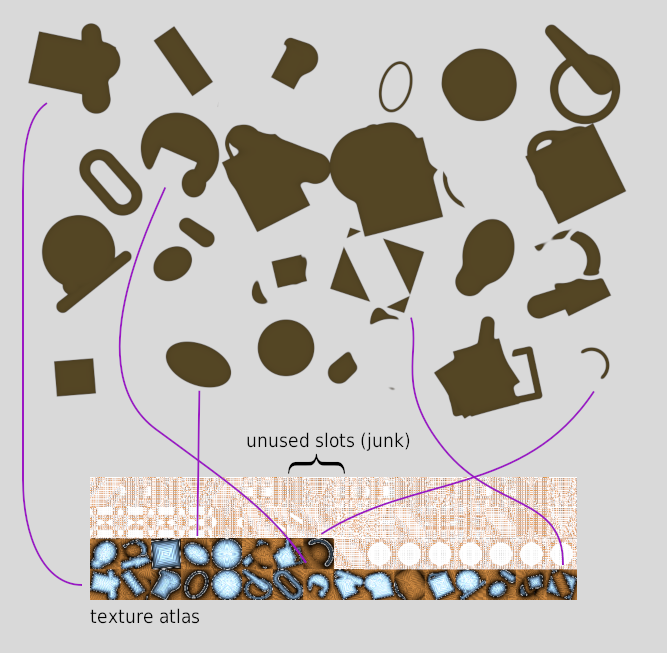
My solution was to calculate the distance values for a shape once, and cache them in a texture atlas. From a high level, the previous mega-shader does this:
- slow: Compute distance from SDF (via RPN interpreter).
- fast(er): Use that distance to choose a color for the pixel.
And we just neatly split those two steps into separate shaders. The distance calculation can be done in the background, as time is available. [note 3] The "choose the pixel color" step is the only one that needs to run at 60Hz.
Below, we see a variety of random objects, and an excerpt from the corresponding texture atlas. Lines are drawn to show how some representative objects correspond to their atlas entries. The atlas also has a bunch of "junk" data in unused slots — this is just whatever happened to be leftover in my graphics card's VRAM at the time. I hope I don't have passwords or something encoded in there (:
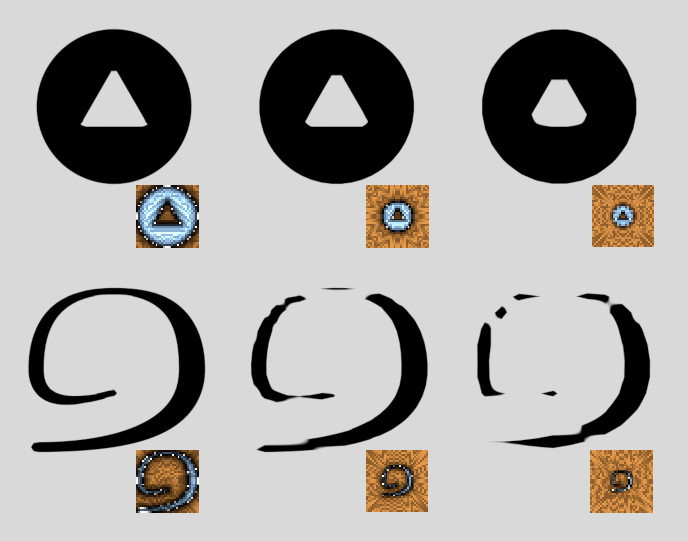
We do pay a price for this speedup: quality is not as good. With the single mega-shader, every single pixel got its own distance value. With this new approach, we fill in the texture with distance values, and if the object onscreen is bigger (this is often true), the texture gets stretched.
Here, we get lucky: standard bilinear interpolation applied to distance values looks pretty good. You can still see some "chunkiness" when the stretching is extreme, but generally it's not very noticeable, except for long and/or thin objects that don't fit well into the texture atlas.
One final note on performance: as the game grew, and many thousands of objects were onscreen with a lot of overlap, eventually even the "compute the final color" shader was too slow as well. This only happened occasionally, in especially busy scenes. But a smooth framerate is vital for a good user experience, so this needed to be fixed. And lucky me: the fix was almost exactly the same as the last one — cache to a texture.
On a given frame, we draw as much as we can to a large offscreen texture, and when it's finished, we simply blit it [note 4] to the real display. Most of the time, this all happens within one frame. But for busy scenes, we will continue drawing the *previous* frame, while we finish building the new one. Importantly, the user can still pan and zoom using that slightly-out-of-date previous frame, so it always feels responsive. To support that, we make the offscreen texture slightly bigger than the real screen. [note 5]
So, for completeness, our main rendering sequence now looks like:
- slow: Compute distance from SDF (via RPN interpreter), and put this in a texture atlas.
- semi-slow: Use that distance to choose colors for pixels, drawing objects to an offscreen texture.
- fast: Blit the offscreen texture to the screen (use an old one if the new one's not done yet).
Only step 3 needs to run every frame, and it is plenty fast for that. There are a lot of little details, like how to make sure the "background" rendering tasks don't use up too much GPU time, various double-buffering and streaming data synchronization issues, and more, but that's the essential process. Let's move on!
Building RPN Expressions
As previously discussed, we want to take an infix expression like:
A ∪ rotate[ (B - shear[ C ]) ]
and turn it into an RPN/postfix expression like:
A rotate[ B shear[ C ] ] - ∪
We want to be able to write client code in the more "natural" infix way, and have the conversion done for us automatically. The solution here is fairly straightforward: I used a "builder"-style interface [note 6] to build the expression. Here's how that example might look:
						// pseudo C++
						auto builder = SdfBuilder(/* params... */)
						builder
						  .circle(posA, radA)      // "A"
						  .transformPush()
						  .matrixRotate(angle)     // rotate[
						    .beginGroup()          // (
						      .box(posB, radiiB)   // "B"
						      .opSubtract()        // -
						      .matrixShear(amount) // shear[
						      .triangle(p1,p2,p3)  // "C"
						    .endGroup()            //
						  .transformPop()          // ] ]
						  .build()                 // finalize the object
To convert infix to postfix, we use the shunting yard algorithm. This can be done incrementally, as we call each method on the builder. It could also be done all-at-once, in the final build() call.
Transforms are Inverted
When thinking about transforms, there are two main mental models: (1) a transform moves the "current coordinate system" or (2) a transform moves "the object."
For instance, if you are holding a camera, and you move it to the left, you could think of this as (1) moving the camera to the left or (2) moving the world to the right.
Both are equivalent, but inverse from each other — moving the coordinate system by +X is the same as moving the world by -X.
Scaling the coordinate system by S is the same as scaling the world by 1/S.
And so on.
This is an old problem, and I think the explanation from the OpenGL "red book," discussing how to think about the matrix stack, is a decent one (some diagrams at the link):
"Thus, if you like to think in terms of a grand, fixed coordinate system ... you have to think of the multiplications as occurring in the opposite order from how they appear in the code. ... Another way to view matrix multiplications is to forget about a grand, fixed coordinate system ... and instead imagine that a local coordinate system is tied to the object you're drawing. All operations occur relative to this changing coordinate system."
When designing this builder interface, it seemed to me that the OpenGL-style approach was best. This can occasionally result in head-scratching moments when combining strange transforms in certain ways, since you have to remind yourself that they are really being applied in reverse order. [note 7]
And while I do think this produces the best experience for the *user* of the builder API, it certainly does make the underlying implementation a little harder to wrap one's head around. It requires mentally switching between the "forward" and "backward" approaches, depending on which part you're looking at.
Uniform Scaling
Recall from Part 1 that we want to support a "uniform scale" transform/operation, but it's a little involved. We now have the tools available to properly express this concept. As before, the essential formula is:

So, we need to scale the position by S, then inverse-scale the resultant distance value.
Repeating the diagram from the earlier article:

After accounting for the fact that "scale by S" actually means "multiply position by 1/S," in our scheme it looks something like this:
						// pseudo C++
						builder
						  .beginGroup()
						    .transformPush()
						    .matrixScale(s) // Note: this multiplies position by 1/s
						       // create the main SDF here
						    .transformPop()
						  .endGroup()
						  // effectively "divide by 1/s"
						  .opDistMul()
						  .constant(s)
Thus, there is some "before" work, and some "after" work, surrounding the user's SDF. Real client code looks like this:
						builder
						  .uniformScaleBegin(s)
						    .circle(0,0,100) // or whatever - this is up to the caller.
						  .uniformScaleEnd(s)
It is slightly awkward to pass s twice (and it must be the same value each time); we could save that in our builder code to simplify things for the caller.
This two-part usage also opens the door to misuse — what if the caller forgets to call uniformScaleEnd?
We've introduced a stateful aspect, which is not ideal.
We could have the inner SDF passed as a function, to seal this gap.
For instance:
						builder
						  .uniformScale(s, [&builder]() {
						    builder.circle(0,0,100)
						  })
I haven't bothered to do this yet. Perhaps when I expose this to more users than just myself (mod tools?), I will clean it up.
Tracking Bounds
Since we're drawing from a texture atlas, each object corresponds to a little rectangle of space. We need some notion of the "bounding box" for a given SDF object, which will map to that rectangle. We want it to be tight-fitting, so we don't waste texels on empty space. In an example earlier in this article, we saw the effect that wasted texels can have — the object's appearance will be degraded.
So, how do we make a tight-fitting bounding box for a given SDF?
Our fundamental shapes (circle, box, triangle, etc) have boxes that are fairly easy to compute. The problem is when we transform them, and combine them with other shapes. Some combinations are easy — if we union two shapes, we can union their bounds, too. Others are harder, such as subtraction. Some examples are given below.
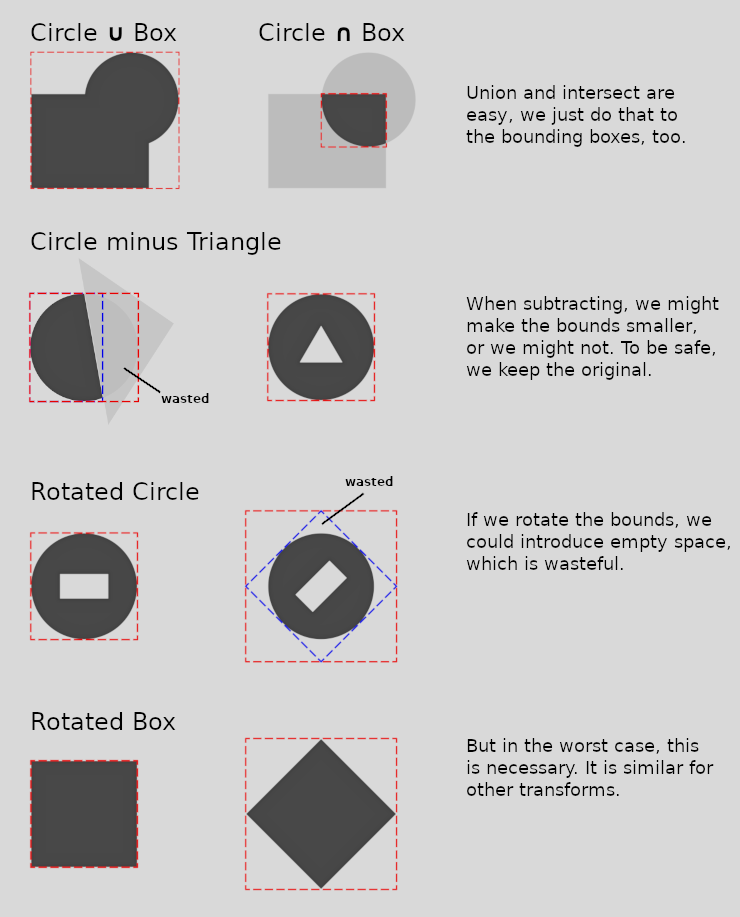
So, the basic process is to start with some known bounds for the basic shapes, then for every transform and operation, come up with a way to combine them into a new bounds for the overall shape. This works reasonably well, but not always. There's also an "escape hatch," where the bounds can be specified by the user, overriding the default choice.
This also means that as we build the RPN expression on the CPU side, we need to track the active stack of transforms, so we can apply them to the bounds, and ultimately produce a final bounds for the shape that we'll send to the GPU. It's not too hard, but some work.
Tightening the Bounds
I haven't implemented this, but one way to improve the bounds on an object would be to sample the SDF itself. Since the distance field tells us how far we are from the object, we could use that information to tighten the bounds. We'd probably start with an approximate worst-case bounds (as above), then sample around the edge of the bounding box to see if we can pull it inwards, and by how much.
I think this could be done with decent effect, but I haven't had enough need for it — it would take time to implement, and there would be some runtime cost, both of which I'd rather use elsewhere, for now.
Referencing Other SDFs
One common need in the game is to be able to reference a "parent" SDF, while building the "child" ones. A typical case is to use the parent as a mask, to ensure the child does not spill out too much.
So, we essentially want to write something like: (...child SDF...) ∩ parent.
In other words, the parent might be seen as "just another shape," in our expression.
But how to implement that?

A simple approach would be, on the CPU side, to simply read the parent SDF and copy its entire set of commands into the child.
If the parent is X + Y - Z, then we expand that in the child to:
(...child SDF...) ∩ (X + Y - Z).
This works, but if a parent has 100 children (quite possible), that parent will be repeated 100 times, wasting space.
Another approach would be to have some kind of "pointer" to the parent SDF, and follow that pointer as we evaluate the child.
This is the approach taken; I call that pointer a "reference" (or "ref").
Amusingly, as with several of our other SDF interpreter problems, the solution here is to use yet another stack! This time, it is an *execution stack* — somewhat like we have for normal code running in a CPU-side program. Every time we encounter a ref, we push a new "current command" index onto the stack, and keep running as normal, evaluating whatever the top-of-stack says. When we get to the last command in an SDF, we pop the stack, and keep going. If the stack is empty, we are done.
Series Summary
In Part 1, we talked about how SDFs are a powerful way to express geometry. They seem borderline *magical*, compared to traditional rendering. They're especially useful in the context of procedural generation, where we want to combine shapes to make objects, without worrying about triangle meshes and all that. But SDFs as they are commonly used have a weakness: they are hardcoded into a bespoke shader. It's hard to find examples of using SDFs in a streaming fashion, with fast-changing arbitrary CPU-generated objects.
Then in Part 2, we discussed a solution to the streaming problem — a shader that acts as a "RPN expression calculator," where the expression encodes arbitrary combinations of basic shapes. This approach allows for a pretty elegant way to build and render SDFs, though we needed to solve some performance problems along the way (see above). And then we made a convenient builder-style interface, to let us compose these expressions very similar to how we might describe them in mathematical notation.
I hope this information helps someone else out there. I really do feel that the SDF approach to graphics is amazingly useful. Perhaps some of the ideas presented here will enable others to overcome their challenges. This was a long series, but there is plenty more beneath the surface; feel free to drop me a line if you want to know more.
Here's a short video of the system being used. On the left, I am writing some Lua code, using the builder interface described above. Whenever I save the file, it gets re-loaded in the game, and the shape gets updated. This provides a nice REPL experience, for fast iteration.
Still making haste ... slowly.
– John
Footnotes:
- Radeon 580 8G, if you're curious
- I imagine this relates to how much space in the register file each thread running on the GPU is allocated? Not really my area of expertise, though.
- Though I will say that calculating how much extra time you expect to have available on a given frame is not exactly a trivial problem. A bit of tracking stats for previous frames, and extrapolating. Getting that timing information out of the GPU is not always straightforward, depending on what rendering library/framework you're using.
- Thus we come full circle with the blitting discussion in Part 1!
- Here, we get lucky *again*, because the game world is largely static — there's no animation or physics, etc. Thus, repeating the same frame a few times is not too noticeable.
- Sometimes this particular style is called "Expression Builder." I try not to get caught up in programming terminology hair-splitting.
- This issue rears its head briefly in the next section, on uniform scaling.
If you like these articles, feel free to sign up for the mailing list:
We also have some social media links, if you want to follow or contact us.

