
The Unreasonable Effectiveness of SDFs, Part 2
Last Updated: 2025-10-09
Is a line from me to you
Streaming SDFs
To recap briefly, we want to send some dynamic data to the GPU, which describes an SDF, and have the shader evaluate that, producing a distance value for each pixel. Once we have that signed distance value, the rest of the rendering task is relatively easy.
Luckily for us, all of the critical pieces (shapes, operations, transforms) have a fairly compact representation. Let's go through a few examples:
Shapes
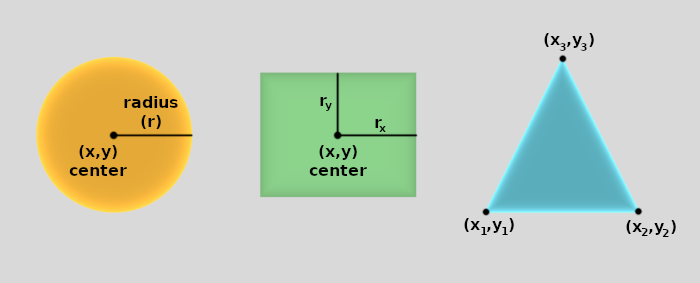
A circle needs to know it's center (x,y) and radius.
That's just 3 numbers.
A box needs to know it's center (x,y), width, and height (for our convenience, we use (radX,radY) instead [note 1]).
That's 4 numbers.
Slightly bigger is a triangle, which needs 3 pairs of (x,y).
That's 6 numbers.
In fact, even the most complex shape I've needed to specify in this game needs only 8 values.
So, we'll end up sending 8 floats (24 bytes) to the GPU per shape, in a given object's SDF.
That's reasonable.
Operations
These are quite cheap — most of them don't require any extra data at all.
For instance, the "union" operation combines the distance values from two different shapes, but does not have any other input.
However, a "union smooth" operation does need an extra piece of data — the smoothing radius.
In short, all the operations need at most 1 extra float.
Easy.

Transforms
Transforms vary a bit.
A common case is using a matrix, which is moderately heavy, but other specialized ones tend to need less data.
An affine transform matrix in 2D needs 2x3 values (6 total), since the last row of (0, 0, 1) is implied.
The most expensive transform I currently have is "twist field," which uses 3 items, each having 4-components (so, 12 numbers in total).
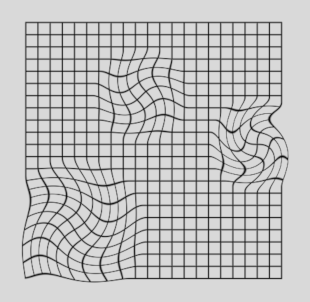
This transform has 3 points (x,y), each one having an intensity and radius, describing a "twist" at that point.
All the twists are combined for the final effect on the position.
Commands
So, the critical data is easy enough to build and send. Now, how should the shader actually *consume* that data? It becomes apparent fairly quickly that there will be some sort of "list of commands to run." Each SDF will have a different list of commands. A given list of commands corresponds to a "math-style" expression that we mentioned in the previous article.
						Input expression:


						  S = A ∪ rotate[ B - C ]


						Commands:


						  SHAPE:A
						  OPERATION:Union
						  BEGIN_TRANSFORM:Rotate
						  SHAPE:B
						  OPERATION:Union
						  SHAPE:C
						  END_TRANSFORM
So clearly, in addition to our Shape, Operation, and Transform pieces of data, we also need some kind of "Command." A Command has some type (eg: SHAPE), and can reference other data (eg: A, in this example). The type can be an enum-style integer, and the reference can also be an integer — an index into some array of data.
This is just the nascent beginnings of an idea — we'll refine it significantly in a moment — but it delivers on the fundamental goal of being able to describe an arbitrary SDF with some simple data that we can interpret on the GPU.
Running It
Just to make it explicit, our final "draw any SDF" shader would look something like this:
First, declare the types involved:
						// pseudo-GLSL:


						struct SdfCommand {
						    uint kind;  // Enum value, like: Shape=0, Operation=1, Transform=2, ...
						    uint param; // Interpreted depending on kind.
						};


						struct SdfShape {
						    uint  kind;    // Enum value, like: Circle=0, Box=1, Triangle=2, ...
						    float data[8]; // Interpreted depending on kind.
						};


						struct SdfOperation {
						    uint  kind;  // Enum value, like: Union=0, Intersect=1, Subtract=2, ...
						    float param; // Interpreted depending on kind.
						};


						struct SdfTransform {
						    uint  kind;     // Enum value, like: Matrix=0, TwistField=1, ...
						    float data[12]; // Interpreted depending on kind.
						};
- We could get rid of the
kindmembers, except inSdfCommand. Then we'd expand the command enum to have values like:Shape_Circle=0,Shape_Box=1, ...,Operation_Union=100, ...,Transform_Matrix=200, etc. - We could remove the
SdfOperationstruct entirely, stashing its data insideSdfCommand::param, using GLSL'suintBitsToFloat().
Then, we declare our arrays of data (pretty boring) as SSBOs, which the CPU fills in:
						// pseudo-GLSL:


						layout(std430, binding=1) readonly buffer allCommandsBuf {
						    SdfCommand allCommands[];
						}
						layout(std430, binding=2) readonly buffer allShapesBuf {
						    SdfShape allShapes[];
						}
						layout(std430, binding=3) readonly buffer allOperationsBuf {
						    SdfOperation allOperations[];
						}
						layout(std430, binding=4) readonly buffer allTransformsBuf {
						    SdfTransform allTransforms[];
						}
And lastly, we use that data to evaluate the SDF, running each command we're given. This is the meat of the shader:
						// pseudo-GLSL (fragment shader):


						in vec2 pos; // Pixel position, in the same space as the SDF to be evaluated.


						uniform uint firstCmdIdx; // Starting point for SDF evaluation.
						uniform uint numCmds;


						out vec4 out_FragColor;


						void main()
						{
						    // Beware: this is not a very good approach!
						    // We'll discuss improvements soon.
						    uint endCmdIdx = firstCmdIdx + numCmds;
						    float distance; // The final answer
						    uint pendingOp = -1u; // Sentinel, meaning "none"


						    // Big loop over all commands:
						    for (uint idx = firstCmdIdx; idx < endCmdIdx; ++idx) {
						        SdfCommand cmd = allCommands[idx];
						        switch (cmd.kind) {


						            case CommandShape:
						                // Get distance to the shape.
						                float newDist;
						                SdfShape shape = allShapes[cmd.param];
						                switch (shape.kind) {
						                    case ShapeCircle:
						                        float center = vec2(shape.data[0], shape.data[1]);
						                        float radius = shape.data[2];
						                        // See previous article for sdCircle() contents.
						                        newDist = sdCircle(pos, center, radius);
						                        break;


						                    // Similar for ShapeBox, ShapeTriangle, etc.
						                    // ...
						                }


						                if (pendingOp == -1) {
						                    // Nothing to combine with.
						                    distance = newDist;
						                } else {
						                    // Apply the operation.
						                    SdfOperation op = allOperations[pendingOp];
						                    switch (op.kind) {
						                        case OperationUnionSmooth:
						                            // See previous article for opUnion() contents.
						                            distance = opUnion(distance, newDist, op.param);
						                            break;


						                        // Similar for OperationIntersect, etc.
						                        // ...
						                    }
						                }
						                break;


						            case CommandOperation:
						                // We can't apply this yet, since we don't have the other
						                // distance to combine with. So, remember it for later.
						                pendingOp = cmd.param;
						                break;


						            case CommandTransform:
						                SdfTransform tform = allTransforms[cmd.param];
						                switch (tform.kind) {
						                    case TransformMatrix:
						                        // We don't do any perspective divide, so only
						                        // need a 2x3 matrix.
						                        mat3x2 matrix = // fill from tform.data[0..5]
						                        pos = ( matrix * vec3(pos, 1) ).xy;
						                        break;


						                    // Similar for TransformTwistField, etc.
						                    // ...
						                }
						                break;
						        } // handle command
						    } // loop


						    // Choosing the final color can be fancy, but is relatively
						    // straightforward, once we have the distance.
						    out_FragColor = calcColorFromDistance(distance);
						}
That's a bit involved!
You can imagine how unwieldy it gets with all the switch cases filled in.
It's also a pretty bad way to evaluate an expression — no support for parentheses, for instance; we'll fix that soon.
However, we do get the small consolation that it actually *works*!
Assuming we fill out those buffers correctly on the CPU side, the GPU will now evaluate an arbitrary SDF on-the-fly, with no need to swap or modify shaders. This fundamentally solves our "SDF streaming" problem, though we can make it a lot better.
I made a small demo to see if performance was acceptable. Below is a video of it. Each little object is a different randomly-populated SDF, composed of a few shapes unioned and/or subtracted from each other in various orders. The wiggling animation is done on the GPU too, to make it a little more interesting — it just perturbs the center of each shape in a random direction, back-and-forth, based on the current time.
Those of you familiar with GPU programming might be somewhat aghast at seeing that shader code.
There's a loop of arbitrary length, nested switch statements, if/else statements, accessing a buffer via non-constant expression, etc.
All of these things, generally speaking, are bad for GPUs — they don't like branching or otherwise "dynamic" code paths.
And heads up: we're only going to make the situation worse with some coming improvements.
The silver lining is that all of this dynamic branching will be consistent within one object. GPUs evaluate a "clump" of pixels at a time, and as long as all of those evaluations take the same path through the shader code, dynamic stuff is not *too* bad for performance. Luckily for us, when drawing a given object, all of its pixels will evaluate the same SDF, which will therefore go through the exact same sequence of branches, and so forth. So while it's still pretty bad, it's the best version of bad that we can hope for.
An Alternative: Tiling
My system uses 1 quad = 1 object = 1 SDF. Then, it renders all those quads in a giant draw call. But there is another way to split up the work: tiling.
We want to render a screenful of SDFs, so we could cut the screen up into arbitrary chunks (tiles), and render each of those independently. In a given tile, we'd only consider the SDFs that could potentially have an impact on that tile. We'd want the tiles to be small enough that the relevant SDF data is not too complex.
In my game, there is often a lot of overlap between objects, so it was not clear to me how to guarantee reasonable-sized SDFs in each tile. But in other situations, tiling might be superior. I know of at least one person doing it that way; perhaps there are others.
Harder, Better, Faster, Stronger
Although we have the nugget of something that works, it could stand some improvement. One problem I immediately hit was how to do grouping of terms. As a math-y expression, we might want something like:
But our shader doesn't handle that — it only goes left to right, and does not know how to handle parentheses. At this point (and with a little help), some crusty neuron from my college days fired, and I realized that I'm basically building a calculator. We have an expression (with parentheses and whatnot) as input, and we want to turn it into a form that's easy for the computer to evaluate. I've done homework problems on exactly this topic — who says schoolwork's not relevant?
The form that we want to evaluate is called Reverse Polish Notation (RPN). The expression above would be transformed into something like this, with no parentheses needed:
To evaluate it, we just go left-to-right (as before), but we also keep a stack of intermediate values. With a normal calculator, we have a stack of numbers, and we do arithmetic operations (add, multiply, etc.). With this "SDF calculator", we have a stack of distance values, and we do SDF operations (union, intersect, etc).
So, to spell out this particular example, we want our shader to do:
						// Commands: A B C D + - ∩
						push A  // stack: A
						push B  // stack: B, A
						push C  // stack: C, B, A
						push D  // stack: D, C, B, A
						apply "+" to the top 2 items on stack
						        // stack: (C + D), B, A
						apply "-" to top 2 items
						        // stack: (B - (C + D)), A
						apply "∩" to top 2 items
						        // stack: A ∩ (B - (C + D))


						// The top of the stack has our answer!
Then, all we have to do is read our final answer from the top of the stack. The changes needed to the shader are not too intrusive. We need to replace our single distance value with a stack of values, instead.
						// ...


						// Declare the stack. Its size corresponds to how
						// deeply-nested of an expression we can handle.
						float distanceStack[16];
						uint distanceStackIdx = 0; // current top of stack


						void main() {


						// ...


						    case CommandShape:
						        float newDist = // ... compute as before


						        // Push the distance onto the stack
						        // No need for the clunky 'pendingOp' handling any more.
						        distanceStack[distanceStackIdx++] = newDist;


						// ...


						    case CommandOperation:
						        // Apply operations as we encounter them, using
						        // the values on top of the stack.
						        SdfOperation op = allOperations[cmd.param];
						        switch (op.kind) {
						            case OperationUnionSmooth:
						                float rhs = distanceStack[distanceStackIdx];
						                float lhs = distanceStack[distanceStackIdx-1];
						                float newDist = opUnion(lhs, rhs, op.param);
						                // Replace the two top values with a single new one,
						                // effectively popping one value.
						                distanceStack[0] = newDist;
						                --distanceStackIdx;


						            // Similar for OperationIntersect, etc.
						            // ...
						        }


						// ...


						}
This is starting to be pretty good. I'm leaving aside the work that's done on the CPU to actually *produce* the RPN expression (that will be in Part 3). But assuming we get that expression built correctly, this shader can evaluate it.
Aside:
Or maybe not!
Actually, a shader like this fails to compile under DirectX, even though it works in OpenGL.
The DirectX compiler does not allow you to index a global array (distanceStack, in this case) with a non-constant value (i.e. distanceStackIdx).
Clearly the hardware can handle it, since OpenGL manages just fine, so I consider this a weakness in DirectX and/or HLSL. For this reason, I'm only shipping my game with OpenGL support, for now. The problem can be worked around, but it is annoying, especially with various extra layers of complexity that the real shader has. If you're interested, somebody made a simple demonstration of the problem: gist link
What About Transforms?
You may have noticed that the above approach handles grouping and nesting of Shapes and Operations, but not Transforms.
As it stands, once a transform is applied, it is permanent, since pos gets modified in-place.
But that doesn't really match our vision.
As we mentioned in Part 1, we might describe groups of transforms with square brackets, in our infix expression:
A ∪ [ (B - [ C ]) ]
But how do we "mix" these transform-describing square brackets with the parentheses, which establish precedence? I was confused by this for a while before realizing the answer is simple: we don't. Transforms do not affect the precedence of operations, they're a separate concern. And vice-versa. It is *common* that we'd want to transform whole sub-expressions at once, but it is not necessary. We can kind of think of transforms living in a separate "plane of existence" from parentheses:
						    [      [   ]  ]
						A ∪   (B -   C  )
Furthermore, I eventually noticed: the list of shapes in both the infix and postfix/RPN formats never changes. In our earlier example, we had:
						infix:
						A ∩ ( B - (C + D) )


						postfix:
						A B C D + - ∩
In both cases, we see A B C D, in order.
The parentheses only affect the operators' order, not the shapes'.
And transforms don't care about operators.
This means we can pretty simply add new "begin transform" and "end transform" commands into our RPN command stream, to affect the relevant shapes.
So, one more example, to drive this home:
						infix:
						A ∩ [ ( B - (C + D) ) ]


						postfix:
						A [ B C D ] + - ∩


						Shader runs these commands:
						  push A
						  begin transform [
						  push B
						  push C
						  push D
						  end transform ]
						  apply +
						  apply -
						  apply ∩
What does the implementation look like?
We already have code to apply a transform — it just manipulates the pos being evaluated.
But we want to limit its effects to within a given [ ... ] zone.
We also want to nest transforms, so we want some sort of push/pop functionality.
... Push and pop, you say?
That sounds like another stack.
Indeed, now in addition to our distanceStack, we'll have a posStack.
The shader code gets updated something like this:
						// ...


						// Now there are 2 stacks.
						vec2  posStack[16];
						uint  posStackIdx = 0;


						float distanceStack[16];
						uint  distanceStackIdx = 0;


						void main() {


						// ...


						    case CommandTransformPush:
						        // Duplicate the top of the pos stack
						        vec2 curPos = posStack[posStackIdx++];
						        posStack[posStackIdx] = curPos;


						    case CommandTransformPop:
						        // Discard the top of the pos stack
						        --posStackIdx;


						    case CommandTransform:
						        // ...
						        switch (tform.kind) {
						            case TransformMatrix:
						                // Much the same, but use top of pos stack
						                // ...
						                posStack[posStackIdx] = matrix * // as before ...
						                break;


						// Likewise, Shapes are updated to use top of posStack
						// ...


						}
The GPU groans (now we have a stack of vec2 — even worse), and DirectX remains estranged from us, but this works!
Note that this approach does mean we can conjure up some strange-looking expressions, like:
[ A ∪ (B ] - C)
Since brackets and parentheses do not "know about" each other, they need not nest. This is confusing, and I avoid doing it. But, there's nothing technically wrong with it.
Mucking With The Distance Field
So far, all of the shapes we've looked at are "normal" — circles, boxes, etc. But thinking more broadly, and looking at the code, it's clear that shapes are really just "things that produce distance values" — it could be anything we want. Likewise, all of the operations we've used have some "set-like" interpretation, to do things in the realm of constructive solid geometry. But these tools we've built are more general.
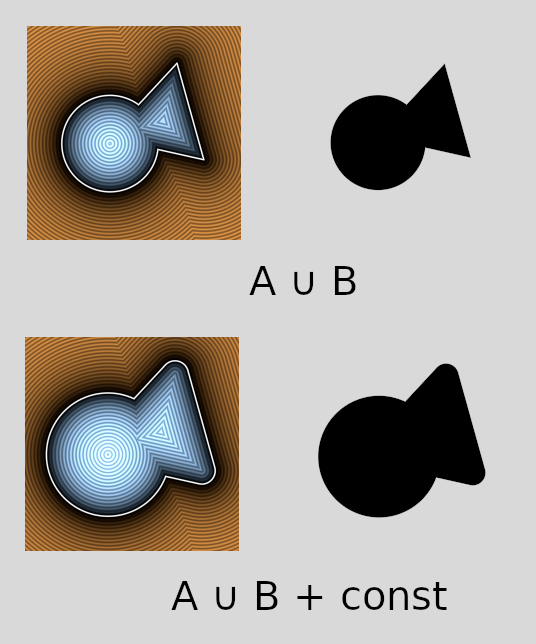
One simple example: adding a constant value to an existing distance field. This has the effect of "growing" or "shrinking" the current object by that amount. To do this, we can concoct a "constant value" shape, and add a "+" operation.
Another example: we can add a "noise" shape, which produces simplex noise for its distance values. Again, we can use a "+" operation to essentially jitter an existing distance field in a smoothly-varying way.
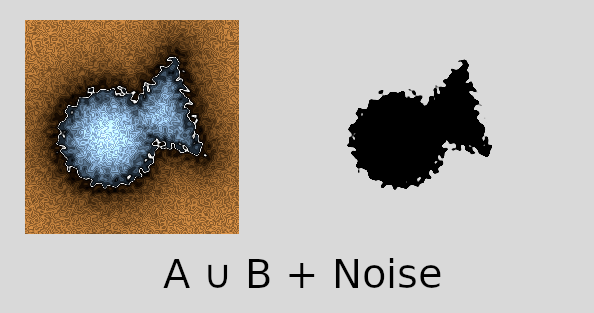
These are all pretty standard tricks to use when building SDFs "by hand," but hopefully this illustrates that they fit into our framework, too; it is quite flexible.
Summary
So, there we have it — a solution to the SDF streaming problem, for complex SDF expressions. I hope it helps someone, because it took some effort to claw my way here (:
I'm quite happy with it, overall. SDFs are a powerful way to express graphics, as we saw in Part 1. And now we have an elegant way to describe them, as a mathematical expression, which gets evaluated by the shader (relatively) efficiently. Once I got here, I felt the "fever had broken" with regards to graphics research for this game. But there were still various practical considerations and details to work out — we'll discuss some of the bigger ones in Part 3.
Prior Art?
On one hand, there's nothing terribly new, here. SDFs have been around for a long time. RPN calculators are an old concept. Running a mini "interpreter" inside a GPU shader has been done before.
However, in my research, I couldn't find anyone who had done quite what I'm describing. I wish I had — it would have saved me some time. But once I worked it out, it seemed so useful, and so not-especially-revolutionary, that it seemed likely I wasn't alone. Over time, I did eventually find some indications of other people doing similar things; I'll mention some of them here:
- A reddit post where someone is asking for advice on a SDF "expression tree" evaluator. As far as I can tell, they aren't evaluating it in the shader, though.
- A HackerNews comment for a SDF interpreter that runs in a shader. This is the person that uses the tiling approach, mentioned earlier. But otherwise it is quite similar in concept to my version. See also their site.
- This stackexchange answer gave me the push I needed to move to an RPN approach, and provided some good perspective.
If you have encountered something similar, please let me know; I'd be curious to hear about it.
Commercial Examples
As mentioned in the previous article, there are some commercial games with SDF worlds — namely Claybook and Dreams. They both have some good presentations describing their technology, [note 2] so based on that information, I'll compare/contrast a little.
They both evaluate SDFs on the GPU (via compute shaders), so they clearly have solved the "streaming problem," too. I don't know the details of how they represent SDFs, but they do both seem to take a "keep the set of shapes and operations simple" approach. Claybook has a few pre-baked shapes ("brushes") stored as 3D textures, and Dreams supports a small set of "edits" (basically add/subtract), with a few shapes, repeated many times. As far as I know, neither offers complex grouping/nesting, or outlandish transforms in the SDF expression. [note 3] This makes sense, since for both games, the dynamic SDF data is "physically-generated" from player actions. Players wielding controllers won't be building nested math expressions; rather, they're splatting and carving on top of what's already there.
In contrast, my game is code-driven. The SDFs are generated by algorithms, and in that context, it makes sense to have a more "math-expression" style approach. Furthermore, both of those games are 3D, which brings an array of additional isses to deal with; supporting diverse operations and transforms might not be practical. Or, maybe they do have something similar to what I described, but they had bigger fish to fry in their tech talks (:
Okay, that was long! If you want to charge ahead, goto Part 3!
Thanks for reading.
– John
Footnotes:
- I discuss the advantages of this approach in another article: "Representing Rectangles."
- The "Part 1" article has more info, but here's the Dreams presentation and the Claybook one.
- In the Dreams talk, I enjoyed the line "edit list => compute shader of doom." That's essentially what I've been describing, too (though it's not a compute shader, and I'm sure it's much simpler than theirs).
If you like these articles, feel free to sign up for the mailing list:
We also have some social media links, if you want to follow or contact us.

