
Representing Rectangles
Last Updated: 2025-10-09
Where's the feeling there?
Still nobody cares
For miles and miles of squares
Introduction
Boxes are extremely common and useful in computer programming. Certainly they are everywhere in graphics applications, but also in more non-obvious cases. Thus, it is a common problem to decide how to represent these boxes.
There is no single best answer! After an overview, I'll summarize several common choices, and discuss the pros and cons of each. There is one that I would recommend "by default"; spoiler: it's the half-open representation, which C++ programmers will be familiar with from that language's treatment of iterators. It can be found in many other places, too. However, in some cases, other representations have overwhelming advantages, as we'll see shortly.
First, a note on generality: I'll often be discussing 2-D rectangles, partially because it's easier to make diagrams of them on this page, and partially because I have personally been dealing with them a *lot* in working on my game (shameless link). But many of the concepts are more general than that. For instance, I mentioned C++ iterators — these typically involve a 1-D span of data, but we can treat that as a "1-D box," in many ways. That's what a conceptual "box" is, after all — a demarcation of some contiguous region of space. That space could be 1-D or 18-D, integer-based or continuous, etc. I'll include a few 1-D examples too, but most of our focus will be on 2-D.
Representations
So, we have boxes:
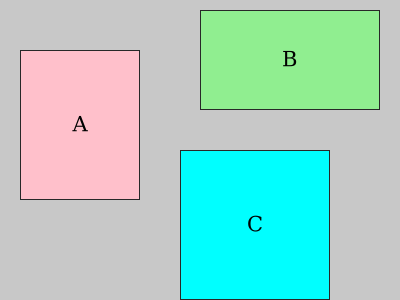
Each one has some important properties, which any child can point out:
- how big it is (width, height)
- where it is located (position)
How might we represent that essential information in a program? The most direct translation of the above observations might be something like:
						{
						  Number posX;
						  Number posY;
						  Number width;
						  Number height;
						}
Vector pos; Vector size;, where each Vector is an appropriate N-dimensional set of values.
Again, for this article I'll focus on a "naïve" 2-D representation.
That kind of compacting/simplifying of the data is relatively trivial and *not* what this article is about.
Okay, we already have a bit if ambiguity creeping in — what does the "position" represent, in terms of the box? Is it the position of one of the corners? Of the center? Something else? Also: what does "Number" mean? As I mentioned earlier, the space in which our rectangle resides might be discrete (eg: integer coordinates) or more "continuous" (eg: floating-point values [note 1]). Let's not get too focused on answers right now, though; we'll cast a wide net first.
When we casually draw a box on paper or such, it often starts us down a "continuous space" representation by default. Let's purposefully impose a grid on our boxes, so we can talk about integer coordinates more clearly, too.

Here, I've numbered the spaces between the grid lines, so each "cell" can be named with x,y coordinates.
This is fairly common in computer-related contexts, where each (x,y) position describes a place where some data can be put — like saying "D5" in a spreadsheet.
In more math-y contexts, we typically label the grid lines themselves, rather than the spaces between them.
Hopefully it's clear that either one will work, but we'll use the cell-based approach for now. [note 2]
In fact, these two different ways of describing positions in space touch on the exact sort of representational issues central to this article — so let's continue!
Staying with our original (pos,size) representation, I'll stop being coy about what "position" might mean — realistically there are only two common choices: the "origin" corner of the box (that is, the corner closest to the origin in your space), or the center of the box.
Other choices, such as a different corner or some arbitrary point on an edge or elsewhere, don't give any real benefits that I'm aware of, make typical calculations harder or more obtuse, and are practically never used.
Position and Size
So, realistically, we have distilled two representations so far:
- origin, size
- center, size
If we try to apply these to box A in our grid example above, there is an immediate problem: the center cannot be represented! Since the box has an even-size width, the x coordinate for the center is "3.5".
If we're using integers for our coordinates, this won't work.
This is a downside of the (center,size) representation — but don't worry, there are cases where we really do want to use it, which we'll talk about soon.
Begin and End
For the programmers among you, integer coordinates are no doubt very familiar, in the guise of array indices. In the C language, for instance, for a 2-D array you have a pointer to the beginning of the array (this is the "box origin" in "address space"), and C leaves it up to you to keep track of the size. This is often known at compile-time, so is just some constant value.
However, many APIs in C and other languages will instead use a (begin,end) or (origin,end) representation, rather than (origin,size).
Translating this back to normal rectangles, this is equivalent to storing (min,max) — two opposite corners of the box.
I think most people would by default use an *inclusive* interpretation of these points, where both the min point and the max point "belong" to the rectangle. As we'll see in a moment, this is *not* the common representation used in programming, and for good reasons. But if we continue with the inclusive approach for one of our examples, it might look like this:

In mathematics, we would call this representation a "closed interval."
In 1-D, we'd use notation like [1,5], to indicate all the numbers ≥ 1 and ≤ 5.
We'd draw this on the number line like so:
![diagram of a number line showing the interval [1,5]](./media/svg/interval_1_5_incl.svg)
But there is also the notion of an "open interval", which includes all numbers *except* the endpoints. The open interval (1,5) would look like so:

This is equivalent to saying "all numbers greater than 1 and less than 5" (or "{ x | x ∈ ℝ, 1 < x < 5 }," in more math-y notation).
In programming, when dealing with ranges of values (such as an array, or a box), it is common to use what's sometimes called a "half-open" representation.
This is where the start point is included, but the end point is excluded.
Continuing our example, we'd use math notation [1,5) to describe a range.
And it is drawn like so:

Because it is such a simple concept, used by different disciplines, there is a bunch of overlapping terminology. The term "half-open" is pretty common; you may also hear "endpoint-exclusive" or just "exclusive" or "one-past-the-end. " They all mean the same thing, though pay attention to context. At one place I worked, the terms "mic" and "mac" were used to mean "min" and "max" but excluding the point itself, though I don't believe that's terribly common.
So getting back to our rectangles, we now have 4 reasonable representations:
- origin, size
- center, size (-) beware integer coordinates
- [min, max] — inclusive
- [min, max) — half-open
Half-open benefits
Let's briefly talk about the benefits of the half-open representation, especially in contrast to the inclusive one. The inimitable Raymond Chen wrote a succinct article on this specific topic, so you might be interested in reading that, too. My take on the essentials is twofold:
First, you can easily compute the size, given [min,max).
It's just: size = max−min.
For the inclusive representation, you must do size = max−min+1.
And that is just talking about integer coordinates, where "1" is the smallest unit available.
For fractional coordinates, to be proper, you'd need to use size = max−min+ulp where "ulp" is the smallest possible increment.
Or perhaps more generally size = justAfter(max−min) if the ulp size can vary, as with floating-point numbers.
Since calculating width and height is commonplace when dealing with rectangles, using an inclusive representation makes algorithms more complicated and less efficient.
This is mainly a practical concern that you learn from experience.
Second, the half-open representation neatly solves what I call the "perfect abutment" problem. Suppose you have two rectangles pressed up against each other:

If we use the inclusive representation, the end of A is x=4 and the beginning of B is x=5.
Since these are integer coordinates, it works okay — there is nothing between 4 and 5 in integer space, so they abut perfectly.
But when we transform our rectangles, this can change.
In Chen's article, he talks about scaling — eg: multiply everything by 2, which gives you A ending at 8 and B beginning at 10.
But now there *is* space between the rectangles — coordinate 9.

You may notice that while the *coordinates* were doubled in this case, the resulting *size* was not! Before, A was 4x5, and after the scaling it is 7x9 instead of the desired 8x10 — another face of the same fundamental problem.
In my game, I ran into this issue in another way: I have some arbitrary-precision coordinates, and when you "zoom in" you effectively add more spaces beyond the decimal. The player can zoom in arbitrarily, so I must always deal with the possibility that there are more zeroes to the right of one of these numbers.
So even if A originally ended at 4 and B began at 5, in a moment we could have more decimal places, and now A ends at 4.000 and B begins at 5.000. But we now have space between them — numbers from 4.001 through 4.999. This is really the same problem as scaling, just a different manifestation — here, the numbers are keeping the same value, but the amount of resolution for representing them increases. It is sort of like how our own universe is expanding — there's more space between objects, even if none of them is individually moving.
So anyway, that's the "perfect abutment" problem.
If we use the half-open [min,max) representation, then it goes away.
In that representation, we have A ending at "5" and B beginning at "5", so there is no opportunity for extra space to creep in during scaling or other transformations.
Let's update our list:
- origin, size
- center, size (-) beware integer coordinates
- [min, max]
- [min, max) (+) easier size calculation, (+) perfect abutment is no problem
So far, things are looking bad for (center,size) and inclusive [min,max] representations — only downsides are listed.
Let's talk about cases when they are advantageous.
In truth, aside from some vague notion of "intuitiveness", the only real benefit to the inclusive [min,max] representation that I have found is that it will not overflow your data type, in situations where that is a concern (such as integers in C, C++, and the like).
In the rare cases where it matters, this can be a real deal-breaker for the half-open approach. For example:
Let's say that you are using integer coordinates, and your integers are quite small. In this example we'll use 4 bits per integer, though in a real-life case I was concerned with 8 bits (1 byte). 4 bits allows tidier diagrams (:
So, our entire representable space looks like this:

And furthermore, let's suppose that we want to be able to represent every rectangle in that space. We have a problem when we want a rectangle that goes all the way to the farthest edge.
In fact, let's say we want a single big rectangle that covers the whole space — we expect it to have width of 16 and height of 16, right?
But the maximum number we can describe with our 4-bit integers is 15 (binary 1111). So, the biggest box we can describe is (0,0)–(15,15). And, using our half-open interval approach, the dimensions of this rectangle are 15-0 = 15. We got 15x15, not 16x16.
In essence, the half-open notation requires you to "sacrifice" one representable value in your number system, to represent "one past the end." We saw this problem with a single big rectangle, but the same problem happens with any rectangle that touches the farthest edges of the space — such as B and C in the diagram.
In fact, this touches on the "grid lines vs. cells" notational choice that we mentioned at the beginning of this article. The half-open approach is more amenable to a grid-line-oriented diagram, while the inclusive approach is more cell-oriented.
For instance, let's show both numbering schemes:

As you can see, to describe a given block of space, the grid line approach needs "one more value" to describe the farthest extent of the rectangle, compared to the cell-based approach. Likewise, the half-open approach wants "one more value" to describe the one-past-the-end position. With half-open, the cell is described as the space *between* two grid lines, whereas with inclusive, each cell has its own single coordinate.
If you were committed to the half-open method in such a constrained environment, you'd have to choose between uncomfortable options:
- Increase the size of your integer. Practically speaking, this usually means doubling the number of bits (eg: from 8 to 16). But that's a big price to pay just to be able to use 1 extra one-past-the-end value. And presumably, if you were packing bits that tightly, you don't want to waste them.
- Change the interpretation of your space, so that the one-past-the-end value is indeed your max integer value. This essentially "shrinks" your space a little — now, in our example, instead of a 16x16 space, we have a 15x15 space. This can complicate the math that maps from other spaces into this constrained integer space. In my case, it was important to have power-of-2 sizes, so this was not an appealing option.
Thus, in limited situations, the inclusive [min,max] representation can be beneficial, to get the most use out of precious few bits. [note 3]
In most other cases, especially when using integer coordinates, the half-open approach is superior.
Centered Coordinates
Now let's discuss the benefits of a (center,size) representation.
In a word, the benefit is "symmetry." A box is symmetric around its center point, and this can make various math simpler to describe and more efficient to compute.
Earlier, we noted the problem of having a center with integer coordinates — it might not be representable. Thus, this approach is typically used in cases where fractional numbers are the norm, such as IEEE floating point numbers, common in GPU programming and elsewhere. If the center of your box is 1 ulp to the left or right of the perfect center, generally nobody cares. [note 4]
An example:
My game heavily uses signed distance fields (SDFs) to describe objects. The formula for the signed distance to a box can be written as:
						// Distance to a box centered at the origin
						float sdBox(vec2 p, vec2 radxy) {
						  vec2 d = abs(p)-radxy;
						  return length( max(d,vec2(0,0)) ) + min( max(d.x,d.y),0 );
						}
Don't worry about the full formula — I just want to draw your attention to the abs(p) usage.
Here, p is relative to the (0,0) origin, and taking the absolute value effectively makes our solution in the (+,+) quadrant of space also apply symmetrically to the other 3 quadrants.
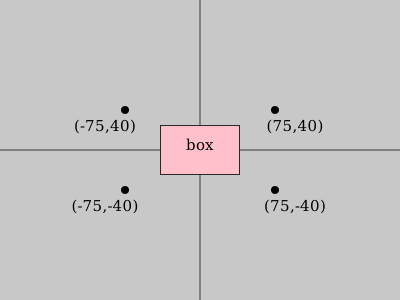
abs()to the same one in Quadrant I.
If we want to use this formula to find the distance from a point to an arbitrary box, and the box has a (center,size) representation, then it is easy to do:
						// Adjust position to be relative to box center
						distance = sdBox(pos-myBox.center, myBox.size/2);
Which looks like:
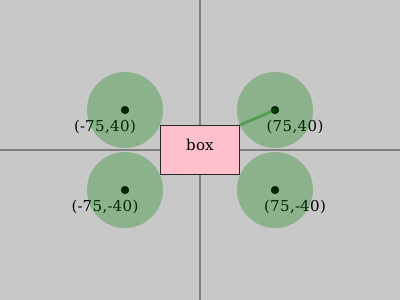
(center,size) representation lets us take advantage of symmetry around the box's center.With other representations, that math would be more complex.
In signed distance functions, this symmetry property is used quite often. Inigo Quilez has a nice list of SDFs, both 2-D and 3-D — see how many places abs() shows up, to get to rough idea.
One small improvement: instead of storing "size" in our (center,size) representation as width and height, we can store it as "radii from the center." This would get rid of the divide-by-2 in our calling code:
distance = sdBox(pos-myBox.center, myBox.radii);
Generally, (center,radii) is my preferred representation in these cases, but (center,size) can also be useful, especially when we need to convert to a [min,max) representation.
One other slight advantage of (center,radii) is that if it is user-facing, I'd say it is more intuitive for most people.
If you are letting users place objects and scale them, they'll probably have a better experience by default doing those activities based on the center point, rather than some corner.
Putting the origin at the center corresponds better to some real-world "center of mass" notion, broadly speaking.
Let's update our list for the last time. These are the primary representations I would recommend, with our accumulated pros and cons:
- origin, size
- center, radii (-) beware integer coordinates (+) symmetry
- center, size — very similar to above, slight preference for radii though
- [min, max] (+) no need for one-past-the-end value
- [min, max) (+) easier size calculation than [min,max], (+) perfect abutment is no problem
Notice that (origin,size) is really almost identical to the half-open [min,max), and it's trivial to convert between them.
The formula is size = max-min, or in the other direction: max = min+size.
And of course we have simply origin = min.
Final Recommendations:
In general, I'd recommend the [min,max) half-open representation as a good default, especially if using integer-style coordinates.
This includes things like pointer arithmetic.
Or largely equivalently, use (origin,size).
For graphics applications, the (center,radii) representation is a good choice, and it is also good for user-facing scenarios.
One situation to beware of: if you want perfect abutment, such as dividing the screen into a grid of non-overlapping perfectly-covering cells, where every pixel belongs to exactly one cell, then you will want the half-open approach, instead.
Final Commentary, Denouement:
Hopefully this article helped clarify some of the issues involved in representing rectangles, and will help you make informed decisions in the future. We also drew some connections between rectangles and iterators, ranges, and math notation; these are not always obvious, but I've found it useful to keep them on the same shelf in my mind, so to speak — perhaps you will, too.
One issue that we didn't discuss, but which had an subtle presence, is the difference between *representing* a rectangle and *interpreting* a representation.
For instance, we made a distinction between "size" as (width,height) versus (radiusX,radiusY).
In reality, we would store it as 2 numbers in either case — it would be up to our naming or conventions to interpret that data in the right way.
All of our box representations come down to storing 4 numbers (for the 2-D case), so at one extreme we could just store that as float[4] or somesuch, leaving the interpretation entirely up to the user.
For instance, the Win32 RECT definition does not mention key information such as whether it is half-open, or even what coordinate system is assumed.
On one hand, this keeps it more general — it could be used in various ways, by various people — but on the other hand, it makes it hard to interpret on its own.
How much you want to tie the specific data representation to a particular *interpretation* for that data is ultimately a question of API design more than anything. And that, dear readers, is a story for another day.
Take care!
– John
Discussion:
Footnotes:
- Sure, even floats are ultimately discrete (as is everything on a computer), but let's not get hung up on technicalities.
- This is somewhat like the distinction between street-based addresses, as used in the US, and block-based addresses, used in Japan. Read more here.
-
C/C++ basically punts on this issue, where it's assumed that types such as
size_tandptrdiff_tare always big enough to represent one-past-the-end. If they're not, you get undefined behavior. - Okay, sometimes people *do* care, such as when fractional rounding makes the difference between a pixel being lit or not. This can lead to "sparkling" aliasing effects. But we leave that aside, here.
If you like these articles, feel free to sign up for the mailing list:
We also have some social media links, if you want to follow or contact us.

